Bindings
Binding mechanism lets you bind your Python objects directly to UI elements and build CRUD interfaces in minutes.
Example: https://github.com/Eugeny/ajenti/blob/dev/ajenti/plugins/test/binder/main.py
Simple bindings
Code:
from ajenti.api import plugin
from ajenti.plugins.main.api import SectionPlugin
from ajenti.ui import on
from ajenti.ui.binder import Binder


class Settings (object):  # use new-style object at all times!
    def __init__(self):
        self.label_text = ''
        self.label_bold = False
        self.label_style = ''


@plugin
class Test (SectionPlugin):
    def init(self):
        self.title = 'Bindings'
        self.icon = 'smile'
        self.category = 'Demo'

        self.append(self.ui.inflate('test_bindings:main'))

        self.settings = Settings()

        # Bind the settings object to the section UI element (self)
        self.binder = Binder(self.settings, self)
        self.binder.populate()

    @on('apply', 'click')
    def on_apply(self):
        self.binder.update()  # update objects from UI
        self.settings.label_style = 'bold' if self.settings.label_bold else ''
        self.binder.populate()  # update UI with objects
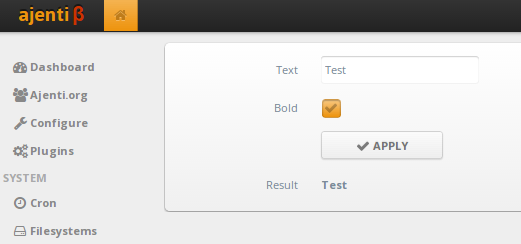
Here, the Settings object acts as a data model. ajenti.ui.binder.Binder object connects data with UI. autodiscover method scans the UI for bindable elements, populate method updates UI with the data from bound objects, and update method applies UI changes to objects.
Layout:
<body>
    <pad>
        <vc>
            <formline text="Text">
                <textbox bind="label_text" />
            </formline>
            <formline text="Bold">
                <checkbox bind="label_bold" />
            </formline>
            <formline>
                <button icon="ok" id="apply" text="Apply" />
            </formline>
            <formline text="Result">
                <label bind:text="label_text" bind:style="label_style" />
            </formline>
        </vc>
    </pad>
</body>
We have added bind attributes to the elements which are to be auto-populated with values. If you want to bind multiple properties, use XML attributes like bind:text or bind:style. Dictionary values and __getattr__ powered indexers can be bound by enclosing the key name in square brackets, e.g.: <label bind:value="[somekey]" />
If you would like to continue binding on a nested object, use binder:context attribute:
<body>
    <vc>
        <label bind:value="simple_str_field" />    <!-- data.simple_str_field -->
        <box binder:context="object_field">
            <label bind:value="objects_str_field" />   <!-- data.object_field.objects_str_field -->
        </box>
        <box binder:context="dict_field">
            <label bind:value="[dict_key]" />  <!-- data.dict_field['dict_key'] -->
        </box>
    </vc>
</body>
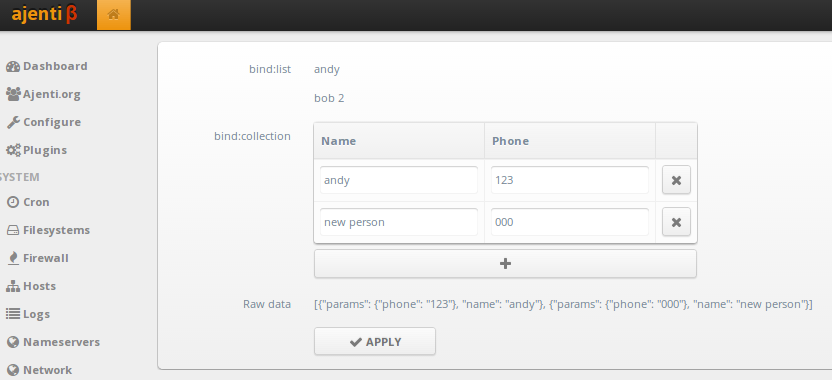
Collection Bindings
Ajenti supports following collection bindings:
- Binding iterable to list of elements (
ajenti.ui.binder.ListAutoBinding)- Binding dict to key-annotated elements (
ajenti.ui.binder.DictAutoBinding)- Binding iterable with a child template (
ajenti.ui.binder.CollectionAutoBinding)
Code:
import json

from ajenti.api import plugin
from ajenti.plugins.main.api import SectionPlugin
from ajenti.ui import on
from ajenti.ui.binder import Binder


class Person (object):
    def __init__(self, name, **kwargs):
        self.name = name
        self.params = kwargs

    def __repr__(self):
        return json.dumps({'name': self.name, 'params': self.params})


@plugin
class Test (SectionPlugin):
    def init(self):
        self.title = 'Collection Bindings'
        self.icon = 'smile'
        self.category = 'Demo'

        self.append(self.ui.inflate('test_bindings_collections:main'))

        andy = Person('andy', phone='123')
        bob = Person('bob', phone='321')

        self.obj_list = (andy, bob)
        self.obj_collection = [andy, bob]

        # This callback is used to autogenerate a new item with 'Add' button
        self.find('collection').new_item = lambda c: Person('new person', phone='000')

        self.binder = Binder(self, self)
        self.refresh()

    def refresh(self):
        self.binder.update()
        self.raw_data = repr(self.obj_collection)
        self.binder.populate()

    @on('apply', 'click')
    def on_apply(self):
        self.refresh()
Layout:
<body>
    <pad>
        <vc>
            <formline text="bind:list">
                <bind:list bind="obj_list">
                    <box>
                        <label bind="name" />
                    </box>
                    <box>
                        <label bind="name" />
                    </box>
                </bind:list>
            </formline>

            <formline text="bind:collection">
                <bind:collection bind="obj_collection" id="collection">
                    <vc>
                        <dt bind="__items">
                            <dtr>
                                <dth text="Name" />
                                <dth text="Phone" />
                                <dth />
                            </dtr>
                        </dt>
                        <button icon="plus" style="mini" bind="__add" />
                    </vc>

                    <bind:template>
                        <dtr>
                            <dtd> <textbox bind="name" /> </dtd>

                            <dtd>
                                <bind:dict bind="params">
                                    <textbox bind="phone" />
                                </bind:dict>
                            </dtd>

                            <dtd> <button icon="remove" style="mini" bind="__delete" /> </dtd>
                        </dtr>
                    </bind:template>

                </bind:collection>
            </formline>

            <formline text="Raw data">
                <label bind="raw_data" />
            </formline>

            <formline>
                <button icon="ok" id="apply" text="Apply" />
            </formline>
        </vc>
    </pad>
</body>
Note the special bind attribute values used in bind:collection:
__itemsdenotes the container for items__adddenotes a button which will generate a new item (optional)__removedenotes a button which will remove an item (optional)